Advances
Managing collaboration advances
Add an advance received for a collaboration, move it from pending to received, and understand when it can be cancelled.
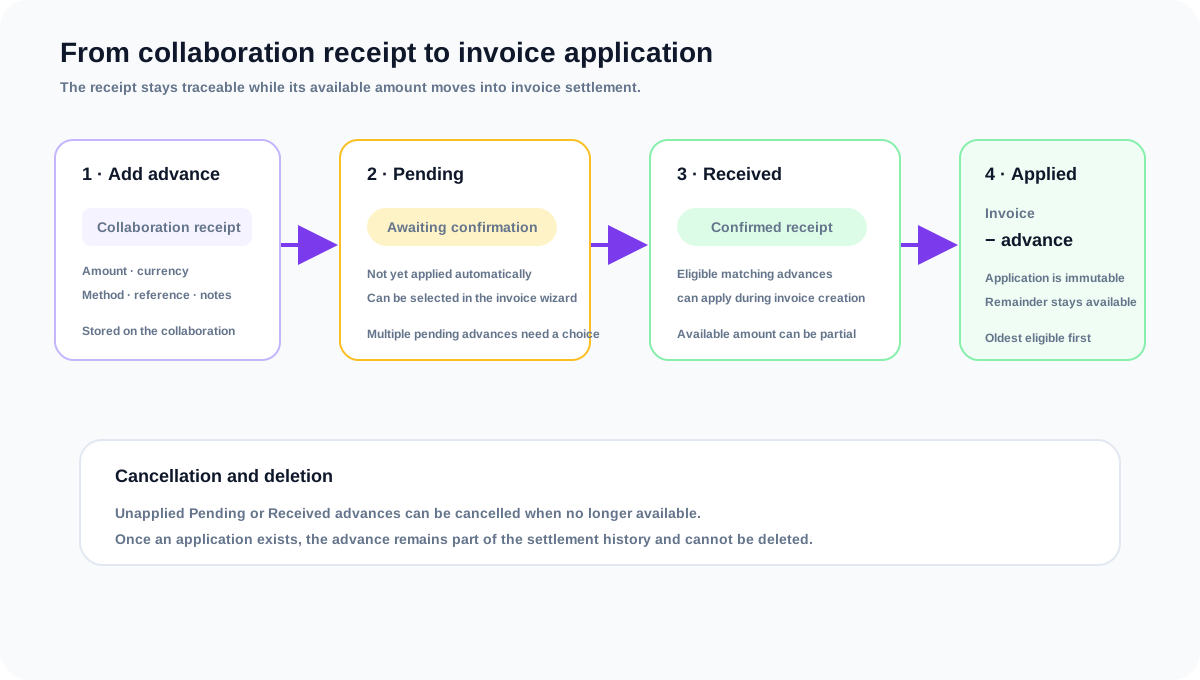
An advance is money received before the collaboration is settled on an invoice. Collabcy keeps the receipt attached to the collaboration first, then records an immutable application when that advance is used against an invoice. This keeps cash received separate from the invoice line items and preserves the settlement history.
Add and confirm an advance
- 1Open the collaboration and choose the option to add an advance.
- 2Enter the amount in the collaboration currency. Add the payment method, reference, and notes when they help your team identify the receipt.
- 3Save the record as Pending when the payment is expected or has not yet been confirmed.
- 4When the money arrives, open the advance and mark it Received with the actual received date.
- 5When creating an invoice for the collaboration, review the eligible advance selection. The selected amount is then applied to that invoice and appears in the invoice settlement summary.
Advance rules
- The advance currency must match the collaboration currency. Collabcy also stores a business-currency equivalent when an exchange rate is available.
- A pending advance is not silently treated as received. It becomes Received when you confirm it or when it is selected for invoice application.
- An advance can be applied in parts. The remaining available amount stays eligible for a later invoice.
- An advance with an invoice application cannot be deleted or cancelled. This protects the immutable settlement record.
- An unapplied Pending or Received advance can be cancelled from the collaboration when it is no longer available for use.
Frequently asked questions
Is an advance the same as a payment?
It is a cash receipt, but Collabcy stores it in the Advances section because it is received at collaboration level before it is assigned to a particular invoice. Once applied, it contributes to invoice settlement without creating a duplicate direct payment.
Can I edit an advance after it has been applied?
No. Once an application exists, the advance cannot be deleted or cancelled. Keep the application history intact and create a new correcting receipt or invoice record if your accounting process requires one.
What if the advance is larger than the invoice?
Only the invoice amount can be applied. The unused remainder stays available on the advance for a later eligible invoice.
Why does my advance not appear in the invoice wizard?
Check that it belongs to the same collaboration, uses the same currency as the invoice, has a positive available remainder, and is not cancelled. Refresh if another invoice may have used part of it.
Related guides
Applying advances to invoices and settling balances
Learn which advances are eligible, how Collabcy applies them to invoices, and how advances change payable and outstanding amounts.
Creating and sending an invoice
Create an invoice from a collaboration, add line items, review tax and totals, then send it to the brand.
Recording payments and understanding balances
Record pending or received payments, understand advance applications, and reconcile what is still owed.