Advances → Invoices
Applying advances to invoices and settling balances
Learn which advances are eligible, how Collabcy applies them to invoices, and how advances change payable and outstanding amounts.
Invoice creation is where a collaboration advance becomes an invoice application. Collabcy calculates the complete invoice first, including line items, discounts, tax, and grand total. It then applies eligible advances in the invoice currency and records exactly how much of each advance was used.
Apply an advance while creating an invoice
- 1Choose the collaboration and complete the invoice line items, tax, discount, and other invoice details.
- 2Review the advances shown by the wizard. Matching Received advances are included automatically; one matching Pending advance can also be included automatically.
- 3If more than one matching Pending advance is available, select the specific pending advances you want to confirm and apply. Do not select an advance that should remain available for another invoice.
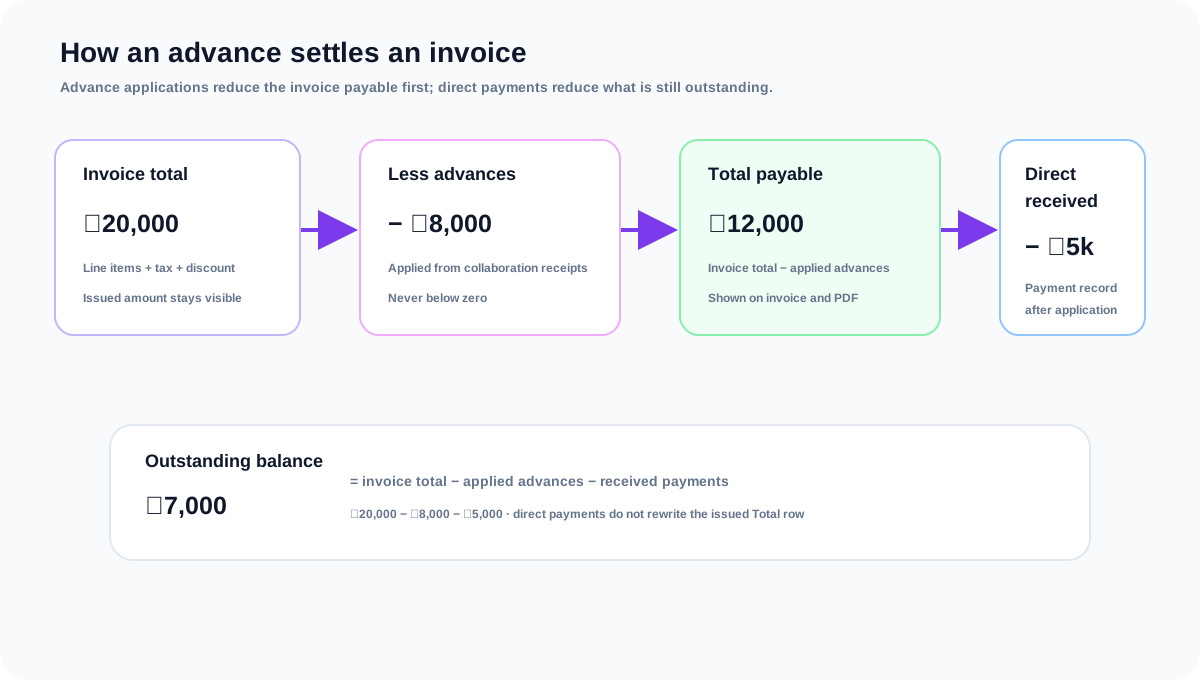
- 4Review the summary: Total is the issued invoice amount, Less Advances is the amount applied from collaboration advances, and Total Payable is the remaining amount after that deduction.
- 5Create the invoice. Selected pending advances are marked Received, and applications are written oldest-first until the invoice total or selected advance availability is exhausted.
- 6Open the invoice detail page to review the applied advance lines and confirm the remaining outstanding balance.
How the amounts relate
- Total Payable = max(invoice total − applied advances, 0). This is the amount left to collect after the advance deduction.
- Outstanding balance = max(invoice total − received direct payments − applied advances, 0).
- Direct received payments reduce the outstanding balance, but they do not change the issued invoice Total row.
- Applied advances are payment-equivalent for settlement and status checks, so they can move an invoice to Paid when the invoice total is covered.
- Revenue recognition is separate from settlement: collaboration revenue excludes tax and fees, while invoice payment tracking uses the invoice total.
- Applications are limited by each advance's remaining available amount and never transfer an advance between collaborations or currencies.
Frequently asked questions
Why does Total Payable differ from Outstanding Balance?
Total Payable subtracts applied advances only. Outstanding Balance also subtracts direct received payments, so it can be lower after a brand has paid part of the remaining invoice.
Are pending advances included in the balance before I create an invoice?
No. A pending advance becomes part of invoice settlement only when it is confirmed or selected for application during invoice creation. Matching received advances are eligible automatically.
Which advance is applied first?
Applications use the oldest eligible advance first, based on creation time. A later advance is used only after earlier available amounts are exhausted.
Can one advance be split across several invoices?
Yes. Each invoice can use only the advance's remaining available amount. The invoice detail and collaboration advance record preserve the separate applications.
What happens when advances cover the whole invoice?
Total Payable and Outstanding Balance become zero, never negative. The invoice can be treated as Paid even when no direct payment record was added for the remaining amount.
Related guides
Managing collaboration advances
Add an advance received for a collaboration, move it from pending to received, and understand when it can be cancelled.
Creating and sending an invoice
Create an invoice from a collaboration, add line items, review tax and totals, then send it to the brand.
Understanding invoice statuses and reminders
Learn what Draft, Sent, Partially Paid, Paid, Overdue, and Cancelled mean in Collabcy.
Recording payments and understanding balances
Record pending or received payments, understand advance applications, and reconcile what is still owed.