Deliveries → Series
Creating series deliverables
Create a scheduled set of independent deliverables with shared series details, individual amounts, and reviewable dates.
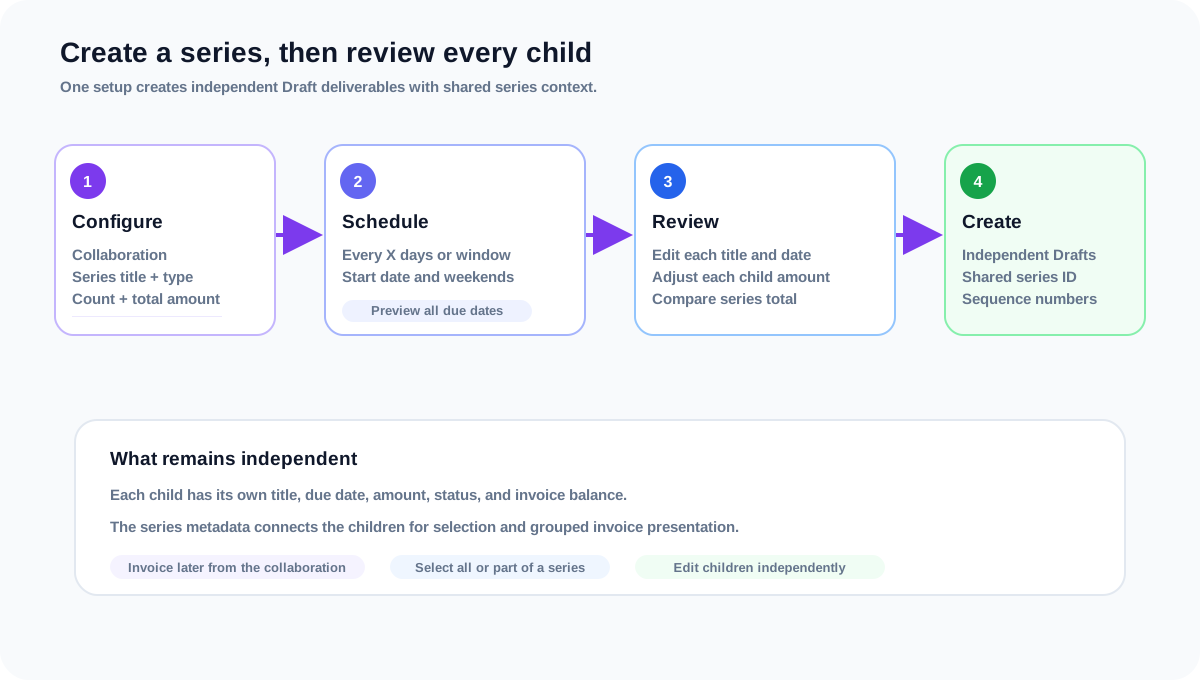
Series deliverables are a faster way to create two or more related deliverables in one operation. Collabcy creates ordinary Draft deliverables, then adds shared series metadata so the group can be selected together later. Each child remains an independent deliverable with its own title, due date, amount, status, and invoice history.
Before you start
- 1Use a collaboration that is eligible for new deliverables. If you opened the series page from a collaboration, that collaboration is already selected.
- 2Confirm the collaboration currency and the total amount you want to distribute across the series.
- 3Check that your plan includes Series Deliverables. If it does not, Collabcy sends you to the upgrade page and preserves the return destination.
Configure the series
- 1Open Deliveries → Create Series Deliverables, or use the series action from a collaboration.
- 2Choose the collaboration, enter a series title, and select the shared content type and platform.
- 3Set the start date, number of deliverables, and total billing amount. The count must be between 2 and 200.
- 4Add an optional note. The note is copied to each child deliverable.
Build and review the schedule
- 1Choose Every X days for a regular cadence, or Distribute across a window when the first and last dates matter more than a fixed interval.
- 2Turn on Skip weekends when Saturday and Sunday should not be used as due dates. Review the extension notice if skipping weekends moves the schedule later.
- 3Use the schedule preview to check the first delivery, calculated end, required end, and every generated date before continuing.
- 4On the review step, edit each child title, due date, or amount when the generated values need adjustment. The sequence number stays fixed.
- 5Compare Original series amount with Current deliverable total. A difference is allowed for review, but check it before creating the records.
- 6Approve a collaboration end-date extension if a generated due date falls after the current end date, then confirm the final creation dialog.
What gets created
- Each row becomes an ordinary Draft deliverable that can be edited, reviewed, approved, published, cancelled, or deleted independently.
- The shared series title, series identifier, and sequence number connect the children for grouping and display.
- The total amount is distributed to the rows in currency precision, and the review table shows any difference after manual edits.
- A series does not create an invoice automatically. Invoice the eligible children later from the collaboration’s New Invoice flow.
Frequently asked questions
Can I change one child after the series is created?
Yes. The children are ordinary deliverables. Edit a child from its profile or the collaboration without changing the other dates, titles, amounts, or statuses.
Can I create a series on a completed collaboration?
No. The collaboration must be in a state that permits creating deliverables. Return to the collaboration workflow first if the action is unavailable.
Related guides
Creating invoices from series deliverables
Select all or part of a deliverable series, review the grouped invoice line, and create an invoice without losing child allocations.
Tracking deliveries from draft to published
Plan content, set due dates, and move deliveries through a controlled review, revision, approval, and publication workflow.
Creating and managing collaborations
Set up a deal, connect it to a brand and creator, and use its detail page as the source of truth.